DANFE
DANFE (Auxiliary Document of the Electronic Invoice) is a printed representation of the NF-e (Electronic Invoice) used in Brazil. It contains key details about the transaction, such as the seller, buyer, products, and taxes.
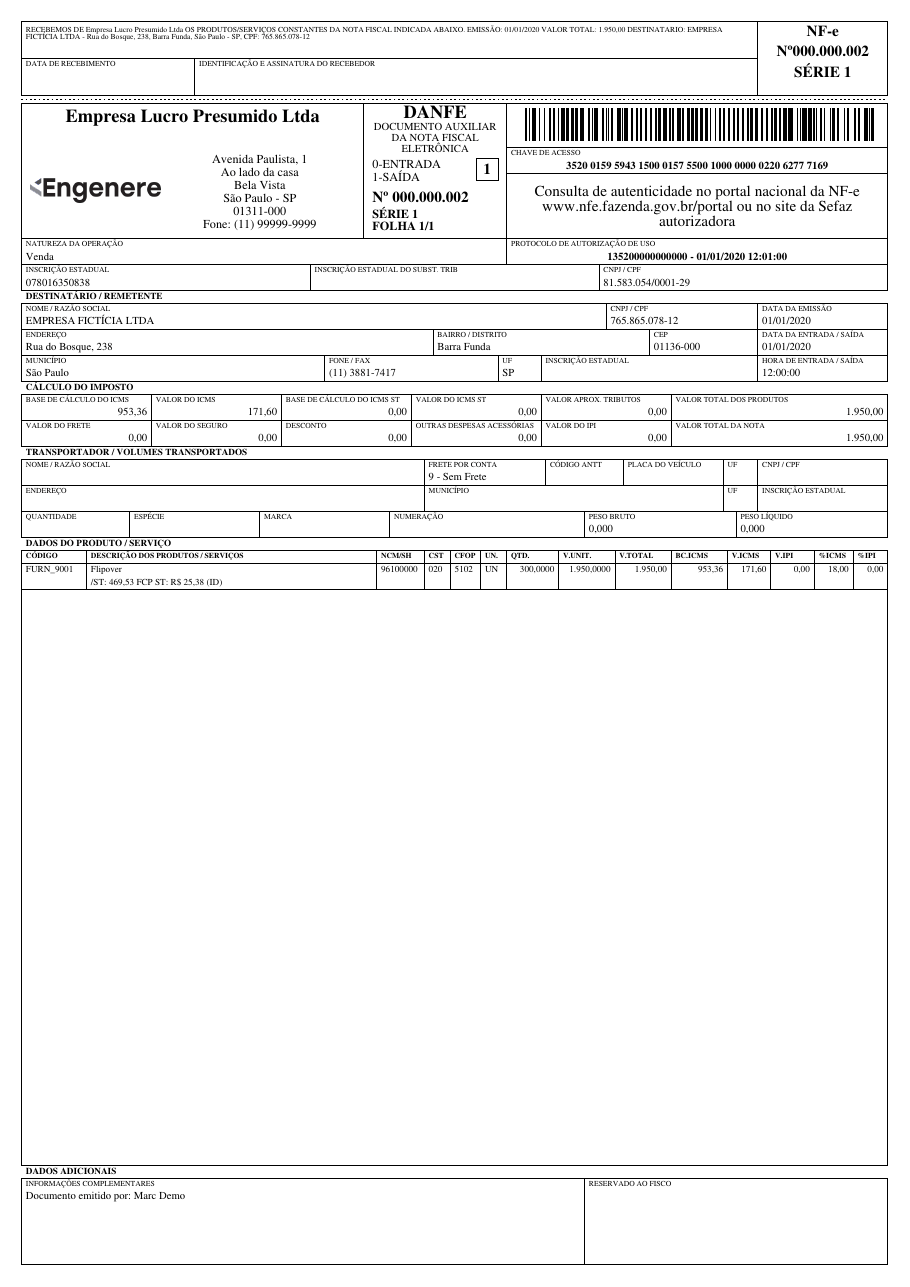
The layout follows the reference model of Technical Note NT 2026.010 (DANFE Reforma Tributária), which adds the IBS, CBS and Selective Tax (IS) of the Brazilian consumption tax reform (RTC) to the DANFE. NF-e issued before December 1, 2026, when the NT goes into production, keep the previous layout (MOC 7.0); see Layout transition.
Try it online with a sample XML
Basic Usage
from brazilfiscalreport.danfe import Danfe

# Path to the XML file
xml_file_path = 'nfe.xml'

# Load XML Content
with open(xml_file_path, "r", encoding="utf8") as file:
    xml_content = file.read()

# Instantiate the DANFE object with the loaded XML content
danfe = Danfe(xml=xml_content)
danfe.output('output_danfe.pdf')
Layout transition
NT 2026.010 changes the DANFE layout on December 1, 2026, with no transition period. The layout option of DanfeConfig picks the layout:
| Value | Layout |
|---|---|
DanfeLayout.AUTO (default) |
The one in force on the NF-e issue date (dhEmi, Brasília time): MOC 7.0 before December 1, 2026, NT 2026.010 from then on. |
DanfeLayout.NT_2026_010 |
NT 2026.010 for any NF-e. |
DanfeLayout.MOC_7_0 |
MOC 7.0 for any NF-e. Deprecated. |
Since AUTO follows the issue date, the same XML always gives the same DANFE: a reprint of an NF-e issued in November keeps the previous layout.
To try the new layout before the date:
from brazilfiscalreport.danfe import Danfe, DanfeConfig, DanfeLayout

config = DanfeConfig(layout=DanfeLayout.NT_2026_010)
danfe = Danfe(xml_content, config=config)
Before December 1, 2026
DanfeLayout.NT_2026_010 is meant for testing and for NF-e issued in homologation (tpAmb = 2). Until December 1, 2026 the DANFE manual in force is the MOC 7.0 (Anexo II), which does not allow suppressing columns such as NCM and the ICMS base, value and rate (item 3.1.7); the new layout moves them. In production, keep AUTO.
Removal of the previous layout
The MOC 7.0 layout is kept only for the transition and will be removed in a future version. From then on, every NF-e is printed in the NT 2026.010 layout. DanfeLayout.MOC_7_0 emits a DeprecationWarning.
Customizing DANFE 🎨
This section describes how to customize the PDF output of the DANFE using the DanfeConfig class. You can adjust various settings such as margins, fonts, and watermarks according to your needs.
Configuration Options ⚙️
Here is a breakdown of all the configuration options available in DanfeConfig:
Logo
- Type:
str,BytesIO, orbytes - Description: Path to the logo file or binary image data to be included in the PDF. You can use a file path string or pass image data directly.
- Example:
- Default: No logo.
Margins
- Type:
Margins - Fields:
top,right,bottom,left(all of typeNumber) - Description: Sets the page margins for the PDF document, in millimeters.
- Example:
- Default: top, right, bottom, and left are set to 5 mm.
Font Type
- Type:
FontType(Enum) - Values:
COURIER,TIMES - Description: Font style used throughout the PDF document.
- Example:
- Default:
TIMES
Font Size
- Type:
FontSize(Enum) - Values:
BIG,SMALL - Description: Font size used throughout the PDF document. The values are multipliers applied to the base sizes (
SMALL= 1.0,BIG= 1.35). - Example:
- Default:
SMALL
Note
FontSize.BIG only takes effect with FontType.TIMES; with COURIER the SMALL size is always used.
Receipt Position
- Type:
ReceiptPosition(Enum) - Values:
TOP,BOTTOM,LEFT - Description: Position of the receipt section in the DANFE.
- Example:
- Default:
TOPwhen portrait,LEFTwhen landscape orientation.
Note
The page orientation is determined automatically by the tpImp tag of the NF-e XML (2 = landscape, any other value = portrait) and is not configurable. In landscape orientation, the receipt position is forced to the far left; customization is not permitted.
Carrier Receipt
- Type:
bool - Description: When set to
True, prints an extra receipt (canhoto de coleta) for the carrier to sign when picking up the goods, in addition to the regular delivery receipt (canhoto de entrega). The extra receipt is only printed when the NF-e has a carrier (transporta) informed. The collection receipt is placed at the page edge (the outermost one), so the carrier can detach it without removing the delivery receipt; each receipt is identified in its text and signature labels. - Example:
- Default:
False
Decimal Configuration
- Type:
DecimalConfig - Fields:
price_precision,quantity_precision(bothint) - Description: Defines the number of decimal places for prices and quantities.
- Example:
- Default:
4for bothprice_precisionandquantity_precision.
Tax Configuration
- Type:
TaxConfiguration(Enum) - Values:
STANDARD_ICMS_IPI,ICMS_ST,WITHOUT_IPI - Description: Specifies which tax fields to display.
- Example:
- Default:
STANDARD_ICMS_IPI
Warning
This feature is not yet implemented; setting it currently has no effect on the output.
Invoice Display
- Type:
InvoiceDisplay(Enum) - Values:
DUPLICATES_ONLY,FULL_DETAILS - Description: Controls the level of detail in the invoice section of the DANFE.
- Example:
- Default:
FULL_DETAILS
Display PIS COFINS
- Type:
bool - Values:
True,False - Description: Whether or not to display PIS and COFINS taxes in the DANFE totals.
- Example:
- Default:
False
Line break in supplementary information
- Type:
bool - Values:
True,False - Description: Break the line on each
";"found in the supplementary information (infCpl) of the DANFE. - Example:
- Default:
False
Product Description Config
- Type:
ProductDescriptionConfig - Fields:
display_branch(bool),display_anp(bool),display_anvisa(bool),branch_info_prefix(str),display_additional_info(bool),display_xped(bool) - Description: Controls what additional information is displayed in the product description column of the DANFE.
display_xpedprints the purchase order of the item (xPed, plusnItemPedwhen present), e.g. "Pedido: 4500012345 Item: 10". - Example:
- Default:
Watermark Cancelled
- Type:
bool - Description: When set to
True, displays a "CANCELADA" watermark on the DANFE for cancelled invoices. If the XML belongs to the homologation environment, the text becomes "CANCELADA - SEM VALOR FISCAL". - Example:
- Default:
False
Note
Independently of this setting, a "SEM VALOR FISCAL" watermark is drawn automatically whenever the XML has no authorization protocol (protNFe) or was issued in the homologation environment (tpAmb = 2). When watermark_cancelled=True, the cancellation watermark takes precedence.
Footer Stamp
- Type:
FooterStamp - Fields:
logo(Optional[Union[str, BytesIO, bytes]]): logo image; defaultNone.text(str): text rendered to the left of the logo; default"".height(Number): vertical area, in mm, reserved for the stamp; default5.logo_max_width(Number): bounding-box width, in mm, used to fit the logo while preserving aspect ratio; default20.spacing(Number): vertical gap, in mm, between the content area and the stamp; default1.
- Description: Renders a custom stamp (logo + text) on every page of the invoice, right-aligned to the page margin. The stamp area is automatically reserved inside the bottom margin — there is no need to enlarge
Margins.bottomto make room for it. - Example:
- Default:
FooterStamp()(empty — nothing is rendered).
Layout
- Type:
DanfeLayout(Enum) - Values:
AUTO,NT_2026_010,MOC_7_0 - Description: DANFE layout.
AUTOpicks the one in force on the NF-e issue date; see Layout transition. - Example:
- Default:
AUTO
Usage Example with Customization
Here's how to set up a DanfeConfig object with a full set of customizations:
from brazilfiscalreport.danfe import (
    Danfe,
    DanfeConfig,
    DecimalConfig,
    FontType,
    FooterStamp,
    InvoiceDisplay,
    Margins,
    ProductDescriptionConfig,
    ReceiptPosition,
)

# Path to the XML file
xml_file_path = 'nfe.xml'

# Load XML Content
with open(xml_file_path, "r", encoding="utf8") as file:
    xml_content = file.read()

# Create a configuration instance
config = DanfeConfig(
    logo='path/to/logo.png',
    margins=Margins(top=10, right=10, bottom=10, left=10),
    receipt_pos=ReceiptPosition.BOTTOM,
    decimal_config=DecimalConfig(price_precision=2, quantity_precision=2),
    invoice_display=InvoiceDisplay.FULL_DETAILS,
    font_type=FontType.TIMES,
    display_pis_cofins=True,
    product_description_config=ProductDescriptionConfig(
        display_branch=True,
        display_additional_info=True,
    ),
    footer_stamp=FooterStamp(
        logo='path/to/footer_logo.png',
        text='Powered by',
    ),
)

# Use this config when creating a Danfe instance
danfe = Danfe(xml_content, config=config)
danfe.output('output_danfe.pdf')
NT 2026.010 layout notes
- The header shows the Código do Regime Tributário (
CRT) and reserves the Tipo de Regime de Apuração do IBS e da CBS field, which stays blank until a future NT defines its XML tag (NT 2026.010, item 4.2). - The totals are split in Total dos Produtos e Total da Nota, Total do ICMS / IPI and Total do IBS / CBS / IS (item 4.1). The FCP/DIFAL and single-phase ICMS lines are printed only when one of their values is not zero, and the single-phase IBS/CBS line only when the
gMonogroup is informed (item 4.4). - The Cálculo do ISSQN block comes before the carrier block and is printed only when
ISSQNtotis informed; the carrier address and volume lines are printed only when the NF-e has them. - Each item shows the CST/CFOP, the NCM and the
cClassTribat the bottom of the description, and the bases, rates and values of ICMS, IBS UF, IBS Município, CBS, IPI and IS (item 4.3). Only the taxes informed in the item are listed; rates and values are printed two per line (ICMS / CBS, IBS UF / IPI, IBS MUN / IS) when they fit, otherwise one per line. - When the
gRedgroup is informed (rate reduction or government purchase), the effective ratepAliqEfetis printed for IBS UF, IBS Município and CBS instead of the regular rate. - Values absent from the XML are left blank instead of being printed as zero (item 4.4).
- When the XML has
infNFeSupl/qrCode, a QR Code box is printed beside Dados Adicionais (item 4.5). While the rules for the QR Code of the regular DANFE are not published, it follows NT 2026.003 (DANFE Simplificado Tipo 2): 22 mm of code inside a 25 x 25 mm box and error correction level M.