DANFSE
DANFSe (Documento Auxiliar da NFS-e) é um documento impresso usado no Brasil para acompanhar a nota fiscal de serviços eletrônica (NFS-e). Ele serve como uma versão simplificada da NFS-e, fornecendo os principais detalhes do serviço prestado, como informações do emitente e do tomador, detalhes dos tributos e valores totais. O PDF gerado segue o leiaute do Sistema Nacional NFS-e e inclui QR Code para verificação de autenticidade no portal nacional.
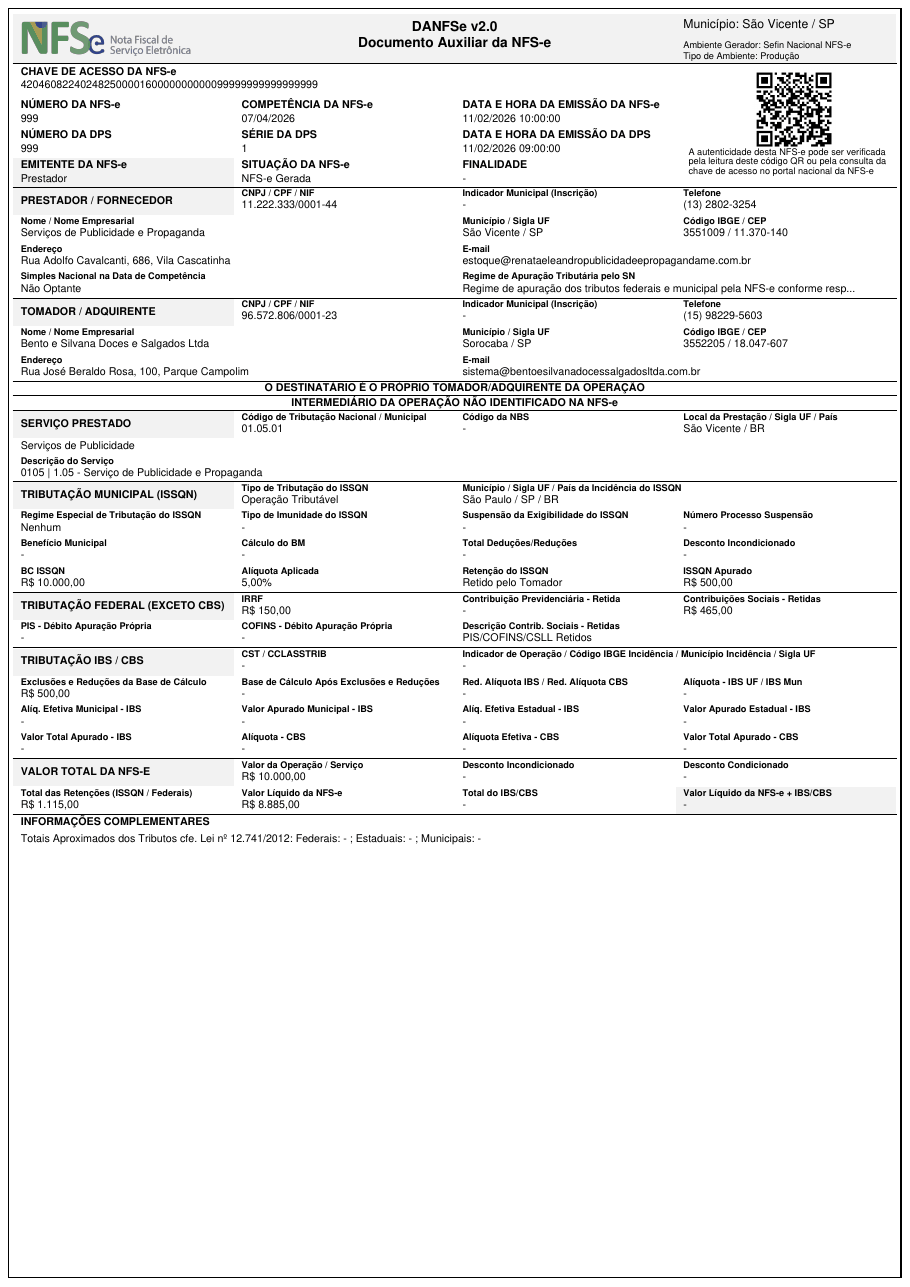
Leiaute de XML suportado
O XML aceito é o da NFS-e no Padrão Nacional (Sistema Nacional NFS-e, namespace http://www.sped.fazenda.gov.br/nfse). Leiautes municipais ABRASF não são suportados.
Instalação
O DANFSe requer a dependência opcional qrcode:
Uso Básico
from brazilfiscalreport.danfse import Danfse

# Caminho para o arquivo XML
xml_file_path = 'nfse.xml'

# Carregar conteúdo do XML
with open(xml_file_path, "r", encoding="utf8") as file:
    xml_content = file.read()

# Instanciar o objeto DANFSe com o conteúdo XML carregado
danfse = Danfse(xml=xml_content)
danfse.output('output_danfse.pdf')
Personalizando o DANFSe 🎨
Esta seção descreve como personalizar a saída PDF do DANFSe usando a classe DanfseConfig.
Opções de Configuração ⚙️
Margens
- Tipo:
Margins - Campos:
top,right,bottom,left(todos do tipoNumber) - Descrição: Define as margens da página do documento PDF, em milímetros.
- Exemplo:
- Padrão: top, right, bottom e left definidos como 5 mm.
Tipo de Fonte
- Tipo:
FontType(Enum) - Valores:
COURIER,TIMES - Descrição: Estilo de fonte usado em todo o documento PDF.
- Exemplo:
- Padrão:
TIMES
Configuração Decimal
- Tipo:
DecimalConfig - Campos:
price_precision,quantity_precision(ambosint; apenasprice_precisiontem efeito no DANFSe) - Descrição: Define o número de casas decimais usado nos valores monetários. Com o padrão
4, os valores saem como "R$ 1.000,0000" — defina2para a exibição monetária convencional. - Exemplo:
- Padrão:
4
Marca d'água Cancelada
- Tipo:
bool - Descrição: Quando definido como
True, exibe uma marca d'água "CANCELADA" no DANFSe para documentos cancelados. Se o XML for do ambiente de homologação, o texto passa a ser "CANCELADA - SEM VALOR FISCAL". - Exemplo:
- Padrão:
False
Note
Independentemente desta configuração, uma marca d'água "SEM VALOR FISCAL" é desenhada automaticamente sempre que o XML foi emitido em ambiente de homologação (tpAmb = 2).
Exemplo de Uso com Personalização
from brazilfiscalreport.danfse import (
    Danfse,
    DanfseConfig,
    DecimalConfig,
    FontType,
    Margins,
)

# Caminho para o arquivo XML
xml_file_path = 'nfse.xml'

# Carregar conteúdo do XML
with open(xml_file_path, "r", encoding="utf8") as file:
    xml_content = file.read()

# Criar uma instância de configuração
config = DanfseConfig(
    margins=Margins(top=10, right=10, bottom=10, left=10),
    font_type=FontType.TIMES,
    decimal_config=DecimalConfig(price_precision=2),
)

# Usar esta configuração ao criar uma instância do Danfse
danfse = Danfse(xml=xml_content, config=config)
danfse.output('output_danfse.pdf')